Free Pomodoro Timer for Notion
Stay focused with the Pomodoro Technique — embedded directly in your Notion workspace. No sign-up required.
How It Works
1
Copy the URL
Click the button above to copy the widget embed link to your clipboard.
2
Paste in Notion
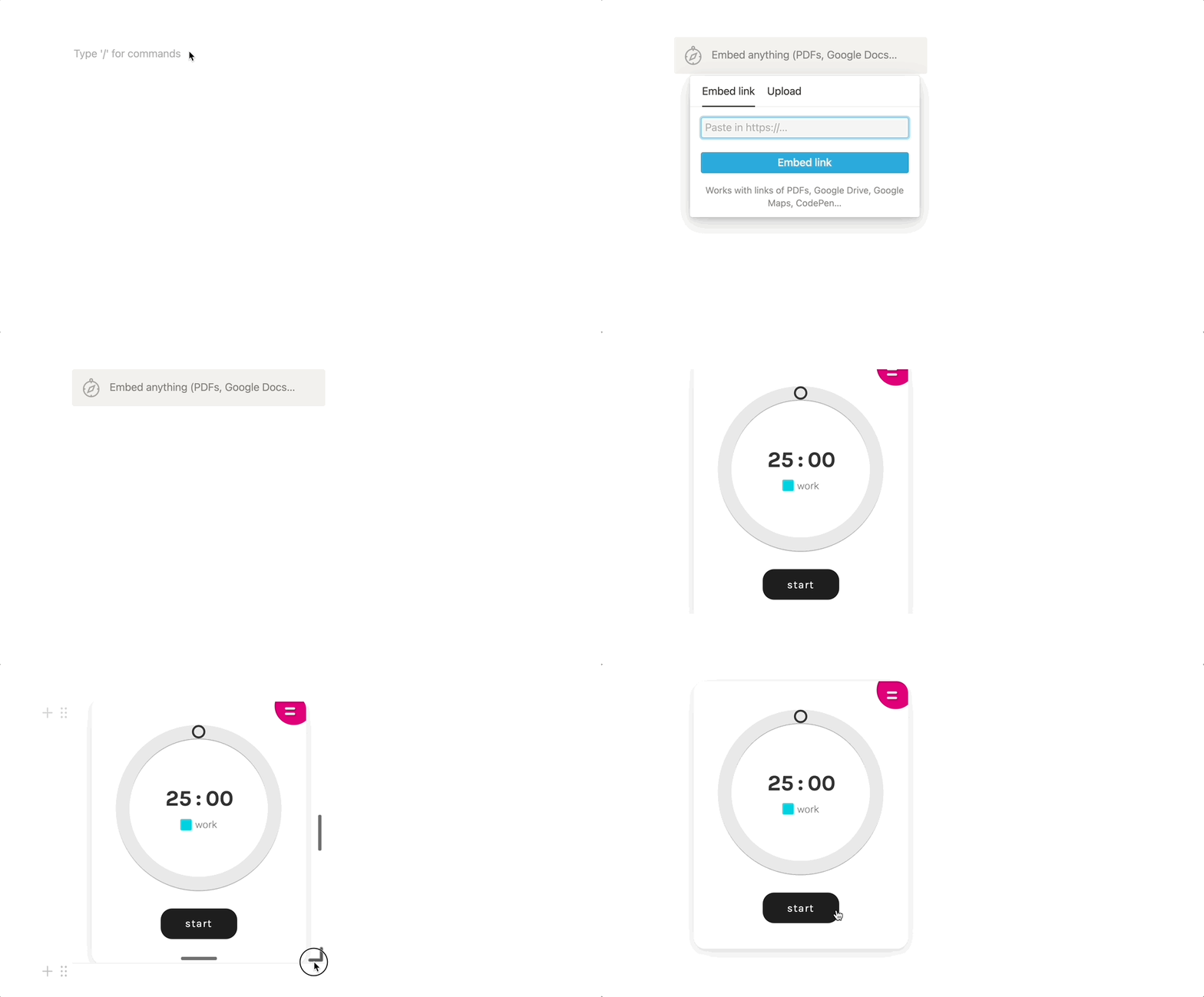
Type /embed in any Notion page, press Enter, and paste the URL.
3
Start Focusing
Your Pomodoro timer is live. Hit play and focus on your work.
Embed in Notion in Seconds
Type /embed in any Notion page, paste the widget URL, and you're done.
The Pomodoro Technique
Developed by Francesco Cirillo in the late 1980s, the Pomodoro Technique uses a simple cycle of focused work and breaks to improve concentration and prevent burnout. Work for 25 minutes, take a 5-minute break, and repeat. After four cycles, take a longer 15-minute break.
Reduced Burnout
Strategic breaks prevent mental fatigue and keep you fresh throughout the day.
Better Focus
25-minute sessions create urgency and eliminate the temptation to multitask.
Track Your Progress
See exactly how you spend your time with built-in focus analytics.
Frequently Asked Questions
What is a Pomodoro timer?
A Pomodoro timer breaks your work into focused 25-minute intervals (called "pomodoros") separated by short breaks. After four pomodoros, you take a longer break. This technique helps maintain concentration and prevents burnout.
How long is a Pomodoro session?
A standard Pomodoro session is 25 minutes of focused work, followed by a 5-minute short break. After completing four sessions, you take a 15-minute long break.
How do I add this timer to my Notion page?
Click "Copy Widget URL" above, then open your Notion page and type /embed. Press Enter, paste the URL, and click "Embed link". The timer will appear directly in your page.
Can I customize the timer duration?
The free version uses standard Pomodoro intervals (25/5/15 minutes). With Blocs Pro, you can create custom presets with any duration for each timer mode.
Does the timer work offline?
Yes. Once the widget is loaded, the timer runs in your browser and does not require an internet connection to count down.
Is this Pomodoro timer free?
Yes, the core Pomodoro timer is completely free to use and embed in Notion. No sign-up required. Blocs Pro unlocks additional features like custom presets, analytics, and theme customization.
Can I track my focus time over multiple days?
With Blocs Pro, you get built-in analytics that track your daily and weekly focus time, including charts and streak tracking. The free version tracks your current session only.
What happens when the timer ends?
You will hear a sound alert when the timer completes. You can customize the alert sound and volume in the widget settings.